Function - Summit HC
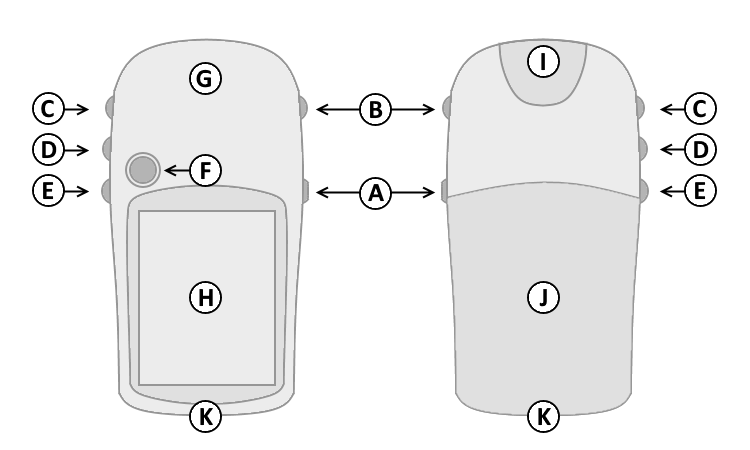
Controls
|
 |
|
|
| |
|
| A. |
Power |
| B. |
Page |
| C. |
Up |
| D. |
Down |
| E. |
Menu/Find |
| F. |
Select/Enter/Mark |
| G. |
GPS Antenna |
| H. |
Color Display |
| I. |
Power/USB Data Port |
| J. |
Battery Cover |
| K. |
Lanyard Attachment |
| |
|
Button Operation
| A. Power Button |
|
D. Down Button |
|
1. Press and hold to turn unit on/off. |
|
1. Select page and menu options. |
|
2. Press and release to cycle the display
backlight on/off. |
|
2. Zoom In on the Map page. |
| B. Page Button |
|
E. Menu/Find Button |
|
1. Press and release to loop through
display pages. |
|
1. Press and release to view option
menu for active page. |
| 2. Press and release to exit/quit a
function. |
|
2. Press and release twice to view
Main Menu. |
| 3. Press and hold to
cycle electronic
compass on/off. |
|
3. Press and hold to display the
Find
Menu. |
| C. Up Button |
|
F. Select/Enter/Mark
Joystick Button |
|
1. Select page and menu options. |
|
1. Press and release to confirm data
entry or menu selections. |
| 2. Zoom Out on the Map page. |
|
2. Press and hold to activate Mark
Waypoint page. |
| |
|
3. Move up, down, right or left to
navigate menu selections or pan map arrow. |
| |
|
|
- [Page] + [Enter] + [Power] = Master Reset
(erases all user data)
- [Enter] + [Power] = Diagnostic Screen
(hardware information)
- [Power] = Cycles Backlight On > Off
- [Page] = Cycles Diagnostic Screens
- Trip Computer > [Joystick Up > Right > Down > Left] =
Diagnostics
- [Joystick Left/Right] = Choose [Shutdown] or
[Stack]
- [Joystick Up/Down] = Select Desired Shutdown
Log
- [Enter] = Displays additional information when available
- [Joystick Up/Down] = Select Desired Stack
Data
- [Page] = Exit Selected Test Mode
Pages
Press and release the Page Button (B) to loop
through display pages.Pages not
added to the Main Page sequence appear in the Main
Menu.
The Satellite page is only displayed at
device start-up.
The Satellite page displays satellite
identification, location and signal strength information.
The upper data field displays GPS
coordinates and estimated location accuracy.
The Map page provides a picture of where
you are, where you are going (path to destination), where you have been
(track log), waypoint names and symbols and other map information.
The 'Track Up' Map page rotates the map as
you move such that waypoints that are ahead of you are displayed at the
top of the display. The North Pointer shows you which direction
on the Map page is north.
The 'North Up' Map page orients the display
like a paper map. Your location and direction of travel are indicated by
the triangular 'Positional Icon'.
Press and hold the Up (C) or Down (D)
buttons to change the map scale as desired.
To change data fields, use the Joystick Button (F) to select the Options
Menu, then select the desired data field and choose from available
Trip Computer data:
The Compass page guides
you to your destination with a graphic compass display and bearing or
course pointer.
When no destination
is selected, the compass ring will indicate your direction of travel.
When
navigating to a selected destination, the compass displays a bearing
pointer indicating the direction to your destination. Simply follow
the arrow to find your destination.
To change data fields, use the Joystick Button (F) to select the Options
Menu, then select the desired data field and choose from available
Trip Computer data:
The Elevation page can display a graph of
elevation change over distance or time, or pressure over time.
The upper data field displays are user
configurable.
To change data fields, use the Joystick Button (F) to select the Options
Menu, then select the desired data field and choose from available
Altimeter page data:
- Ambient Pressure -
the Uncalibrated current pressure.
- Ascent Average - the Average
vertical distance of ascent.
- Ascent Maximum - the Maximum ascent
rate in feet per minute.
- Ascent Total - the Total distance
ascended.
- Barometer - the Calibrated current
pressure.
- Descent Average - the Average
vertical distance of descent.
- Descent Maximum - the Maximum
descent rate in feet per minute.
- Descent Total - the Total distance
descended.
- Elevation - the Distance above
or below mean sea level.
- Elevation Maximum - the Highest
elevation reached.
- Elevation Minimum -
the Lowest elevation reached.
- Glide Ratio - the Ratio of
horizontal distance traveled to vertical distance traveled.
- Glide Ratio to Destination - the
Glide ratio required to descend from the current position to the
destination position.
- Vertical Speed -
Your rate of altitude gain/loss over time.
- Vertical Speed to Destination - the
Rate of ascent or descent to a predetermined altitude.
The Trip Computer page displays up to eight
different types of navigation data.
Each data field is user configurable.
To change data fields, use the Joystick Button (F) to select the Options
Menu, then select the desired data field and choose from available Trip
Computer data:
-
Accuracy of GPS - the Current
accuracy of your GPS determined location.
- Bearing - the Compass
direction from you current location to a destination point.
- Course - the Compass
direction from your starting location to a destination point.
- Depth - the Depth of water from
sonar NMEA input.
- Distance to Destination - the
Entire distance of a route, from start to finish.
- Distance to Next - the
Remaining distance to the next waypoint.
- ETA at Destination - the Estimated
time you will arrive at the route destination, if current speed and
course are maintained.
- ETA at Next - the Estimated time
you will arrive at the next point on the route, if current speed and
course are maintained.
- Elevation - the Distance above
or below mean sea level.
- Glide Ratio - the Ratio of
horizontal distance traveled to vertical distance traveled.
- Glide Ratio to Destination - the
Glide ratio required to descend from the current position to the
destination position.
- Heading - the Direction of travel
as indicated by a compass, in degrees or cardinal letters (N, S, W, E).
- Location (lat/lon) - Current
GPS position.
- Location (selected) -
Displays the current position in the selected position format.
- Odometer - the Total
distance traveled for all trips.
- Off Course - the Distance
left or right you are from the original course (path of travel).
- Pointer - Indicates
direction to next destination.
- Speed - the Current vehicle speed
measured in miles per hour (MPH), kilometers per hour (KPH), or knots.
- Speed
Maximum
- the Maximum speed recorded since last Trip Computer reset.
- Speed Moving Average
- the Average speed while moving since last Trip Computer reset.
- Speed Overall Average - the Average
speed while moving and stopped since last Trip Computer reset.
- Sunrise - the Time of
sunrise for current date and location.
- Sunset - the Time of sunset for current
date and location.
- Time to Destination - the Estimated
time to the final destination, if current speed and course are
maintained.
- Time to Next - the Estimated time
to the next point on the route, if current speed and course are
maintained.
- Time of Day - the Current time and
date, displayed in 12 or 24 hour format, in local time or universal (UTC)
time.
- To Course - the Compass
direction you must travel to get back to original course.
- Trip Odometer - the Total
distance traveled since last Trip Computer reset.
- Trip Time - Moving -
the Total time moving since last Trip Computer reset.
- Trip Time - Stopped - the Total
time stopped since last Trip Computer reset.
- Trip Time - Total - the Total time
tracking since last Trip Computer reset.
- Turn - the Direction of, and
distance to, the next turn on an active route.
- Velocity Made Good - the
Rate of closure on a destination based on current speed and
course.
- Vertical Speed - the Rate
of altitude gain or loss over time.
- Vertical Speed to Destination - the
Rate of ascent or descent to a predetermined altitude.
- Water Speed - the Current speed
over water (acquired from external measurement devices).
- Water Temperature - the Temperature
of water at a measured depth (acquired from external measurement
devices).
- Waypoint at Destination - the
Last waypoint on a route.
- Waypoint at Next - the Next
waypoint on a route.
The Menu page provides access to advanced features
and settings.
Pages added to the Main
Page sequence do not appear in the Main Menu.
Move the Joystick
Button (F) to highlight the desired menu selection.
Press the Joystick Button (F) to activate the
highlighted menu selection:
